
DNS Email Authentication: SPF, DKIM, and DMARC
When you configure a custom sender domain in Zluri, you need to add DNS records to verify that domain and authenticate your emails. This page covers the verification steps, what each record does, and the underlying protocols that make email authentication work.
Domain authentication (DNS verification)
When a custom sender domain is configured (for example, acme.com), DNS authentication ensures emails sent from the platform are trusted and less likely to land in spam.
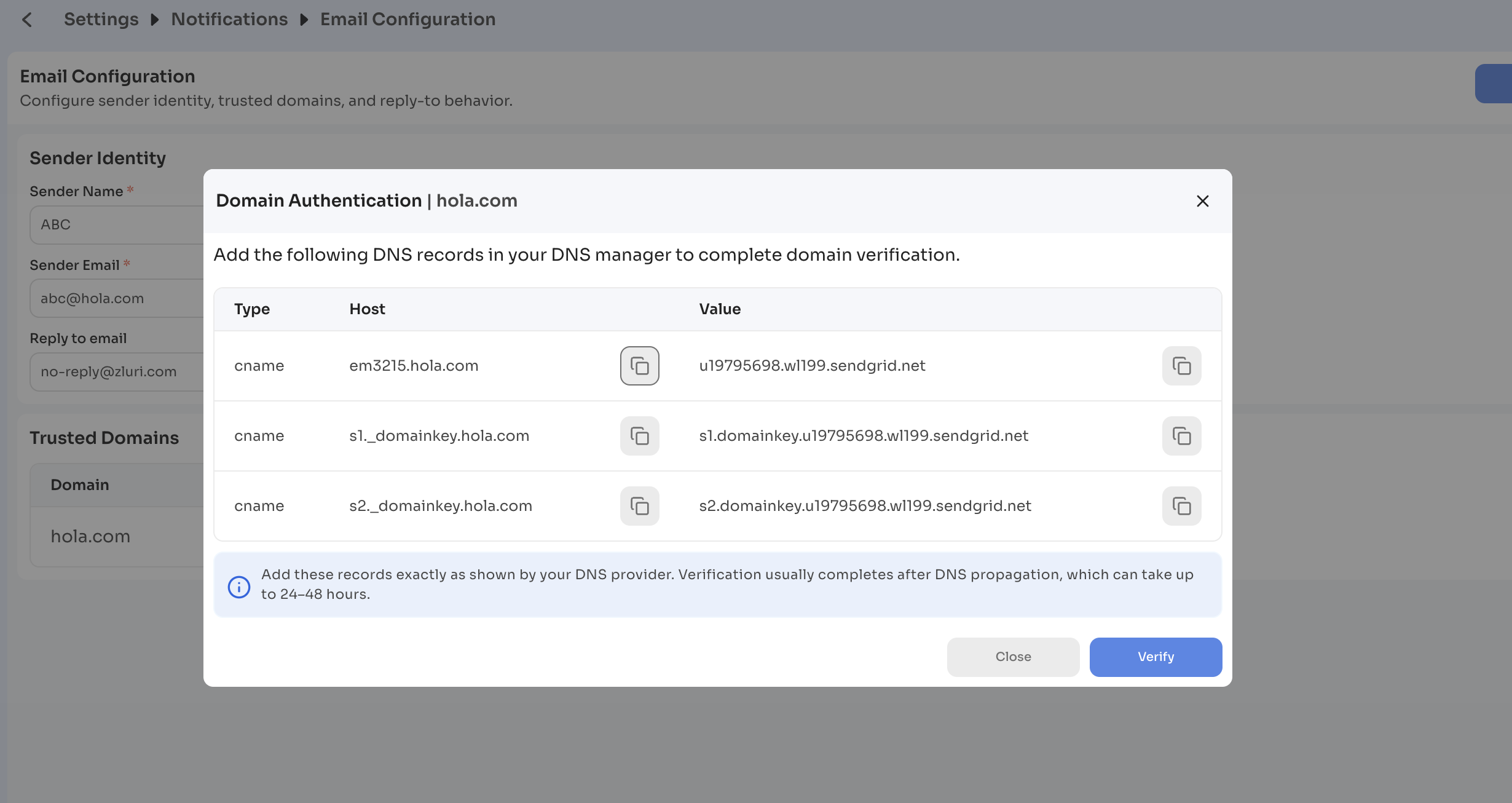
When you click View DNS, a modal opens with three CNAME records to add at your domain provider:
| Type | Purpose | Host | Value |
|---|---|---|---|
| CNAME | Tracking / link branding — makes links in emails appear to come from your domain instead of SendGrid | em3215.acme.com | u19795698.wl199.sendgrid.net |
| CNAME | DKIM record 1 | s1._domainkey.acme.com | s1.domainkey.u19795698.wl199.sendgrid.net |
| CNAME | DKIM record 2 | s2._domainkey.acme.com | s2.domainkey.u19795698.wl199.sendgrid.net |
The host and value shown above are examples. Use the values displayed in your modal, which are generated for your specific domain.
Why DNS verification is required
DNS verification enables:
- DKIM authentication — proves emails are legitimately sent from your domain
- Domain alignment — improves email deliverability
- Spam reduction — helps avoid Gmail and Outlook flagging emails as spam
What happens after adding the records
- DNS propagates across the internet. This typically takes 24 to 48 hours.
- Click Verify in the modal.
- The system checks the DNS records and confirms domain ownership.
- Once verified, the domain is activated for sending.
Verification states
The domain can be in one of three states, shown in the Verification column of the Trusted Domains table:
| State | Meaning |
|---|---|
| In-progress | Verification has been initiated but not yet completed. DNS records may still be propagating. |
| Verified | The system has confirmed domain ownership. The domain is active for sending. |
| Failed | Verification could not be completed. An error message appears: Domain verification failed. Check your DNS records. Review your DNS configuration and click Verify again. |
How email authentication works
When you send emails through Zluri, receiving mail servers need a way to verify that the email actually came from you and not someone impersonating your domain. This is where DNS-based email authentication comes in.
There are three protocols that work together to make this happen: SPF, DKIM, and DMARC. The sections below explain what each one does, how they work, and why they matter.
What is DNS and why does it matter here?
DNS (Domain Name System) is essentially the internet's address book. Beyond resolving domain names to IP addresses, DNS also stores text-based records (called TXT records) that email servers use to look up authentication information for a domain.
All three protocols — SPF, DKIM, and DMARC — are configured as DNS records on your domain.
SPF (Sender Policy Framework)
What it does
SPF lets you declare which mail servers are allowed to send email on behalf of your domain. When an email arrives, the receiving server checks your domain's DNS to see if the sending server is on that approved list.
How it works
- You add a TXT record to your domain's DNS that lists authorized IP addresses or hostnames (for example,
v=spf1 include:sendgrid.net ~all). - When someone receives an email from your domain, their mail server does a DNS lookup for your SPF record.
- It checks whether the IP address that sent the email matches one of the authorized senders.
- If it matches, SPF passes. If not, it fails and — depending on your settings — the email may be rejected or flagged.
What it protects against
SPF prevents other servers from spoofing your domain's email address at the network level (specifically, the envelope sender address used during SMTP transmission).
Limitations
SPF only checks the envelope sender (used during delivery), not the From address visible to the recipient. It also breaks when emails are forwarded, because the forwarding server's IP won't be in your SPF record.
DKIM (DomainKeys Identified Mail)
What it does
DKIM adds a cryptographic signature to every outgoing email. This signature lets receiving servers verify that the email content hasn't been tampered with in transit, and that it genuinely originated from your domain.
How it works
DKIM uses a public-private key pair:
- Your email provider (for example, SendGrid) generates a private key and a corresponding public key.
- The public key is published in your domain's DNS as a TXT record (for example, under
s1._domainkey.yourdomain.com). - When an email is sent, the private key generates a unique hash of the email headers and body. This hash is attached to the email as a
DKIM-Signatureheader. - When the receiving server gets the email, it fetches your public key from DNS and uses it to decrypt the signature.
- It then independently hashes the same email content and compares the two. If they match, DKIM passes — the email is authentic and unmodified.
What it protects against
DKIM ensures message integrity — it detects if the email was altered after being sent. It also ties the email to your domain, making it harder for attackers to forge emails that appear to come from you.
Key concepts
- Selector: The part of the DNS lookup path that identifies which key to use (for example,
s1ins1._domainkey.yourdomain.com). You can have multiple selectors for different sending services. - Signing domain (d= tag): The domain that signed the email, included in the
DKIM-Signatureheader.
DMARC (Domain-based Message Authentication, Reporting & Conformance)
What it does
DMARC builds on SPF and DKIM. It lets you define a policy for what receiving servers should do when an email fails authentication, and it gives you reporting so you can see what's happening with your domain's email.
How it works
- You publish a DMARC record in DNS (for example,
v=DMARC1; p=quarantine; rua=mailto:[email protected]). - When a receiving server gets an email claiming to be from your domain, it checks whether SPF or DKIM passes and whether the authenticated domain aligns with your From address.
- Based on your DMARC policy, it decides what to do if authentication fails:
p=none— take no action; just send reports (good for monitoring)p=quarantine— move suspicious emails to spam/junkp=reject— reject the email outright
- Receiving servers send aggregate reports to your specified email address, giving you visibility into who is sending email on your domain's behalf.
What it protects against
DMARC closes the gap that SPF and DKIM leave individually. Because it checks alignment (the authenticated domain must match the visible From address), it prevents attackers from passing SPF/DKIM with a different domain while spoofing your From address.
DMARC alignment
- SPF alignment: The domain in the envelope sender must match the From domain.
- DKIM alignment: The
d=tag in the DKIM signature must match the From domain.
Either one passing with alignment is sufficient for DMARC to pass.
How the three protocols work together
| Protocol | What it verifies | Method |
|---|---|---|
| SPF | Authorized sending server | IP address check via DNS |
| DKIM | Message integrity + domain ownership | Cryptographic signature via DNS |
| DMARC | Policy enforcement + alignment | Builds on SPF + DKIM results |
A properly authenticated email will:
- Come from an IP listed in your SPF record
- Carry a valid DKIM signature that matches your public key
- Pass DMARC alignment between the authenticated domain and your From address
Why this matters for deliverability
Email providers like Gmail and Outlook use these records to decide whether to deliver, flag, or reject email. Without proper authentication:
- Your emails are more likely to land in spam
- Your domain is more vulnerable to being spoofed in phishing attacks
- You have no visibility into unauthorized use of your domain
Setting up SPF, DKIM, and DMARC correctly is one of the most impactful steps you can take to protect your domain's sending reputation.
Updated 5 months ago