
Recurring Certifications
How Zluri handles recurring access certifications
While creating access certifications, you can set them to recur at fixed intervals such as monthly, quarterly, or custom durations up to 12 months. This article explains how Zluri handles these recurring certifications.
Zluri uses the Review start date of the first certification as a reference point for future schedules. Intervals between review and remediation end dates stay consistent.
Say a certification has the following schedule:
- Review start date: 01 Jan 2025
- Review end date: 15 Jan 2025 (14 days from review start)
- Remediation end date: 20 Jan 2025 (5 days from review end)
The upcoming instances will follow this schedule:
| Instance | Review start date | Review end date | Remediation end date |
|---|---|---|---|
| 1 | 01 Jan 2025 | 15 Jan 2025 | 20 Jan 2025 |
| 2 | 01 Feb 2025 | 15 Feb 2025 | 20 Feb 2025 |
| 3 | 01 Mar 2025 | 15 Mar 2025 | 20 Mar 2025 |
| 4 | 01 Apr 2025 | 15 Apr 2025 | 20 Apr 2025 |
| 5 | 01 May 2025 | 15 May 2025 | 20 May 2025 |
Accounting for month-end dates
There might be cases where the Review start date doesn’t exist in the following month, (for example, if you choose 31 January, which doesn’t exist in shorter months like February and April).
Assume a certification with the following schedule:
- Review start date: 31 Jan 2025
- Review end date: 15 Feb 2025 (15 days from review start)
- Remediation end date: 20 Feb 2025 (5 days from review end)
Here, Zluri will automatically adjust the start date to the last day of that month (28 February or 30 April). Everything else stays identical:
| Instance | Review start date | Review end date | Remediation end date |
|---|---|---|---|
| 1 | 31 Jan 2025 | 15 Feb 2025 | 20 Feb 2025 |
| 2 | 28 Feb 2025 | 15 Mar 2025 | 20 Mar 2025 |
| 3 | 31 Mar 2025 | 15 Apr 2025 | 20 Apr 2025 |
| 4 | 30 Apr 2025 | 15 May 2025 | 20 May 2025 |
| 5 | 31 May 2025 | 15 Jun 2025 | 20 Jun 2025 |
Set up a recurring certification
Recurrence is configured in the last step of the certification wizard. See Create an access certification for the earlier steps.
-
In the Complete Setup step, set the Review Start, Review End Date, and Remediation End Date under Certification Schedule.
-
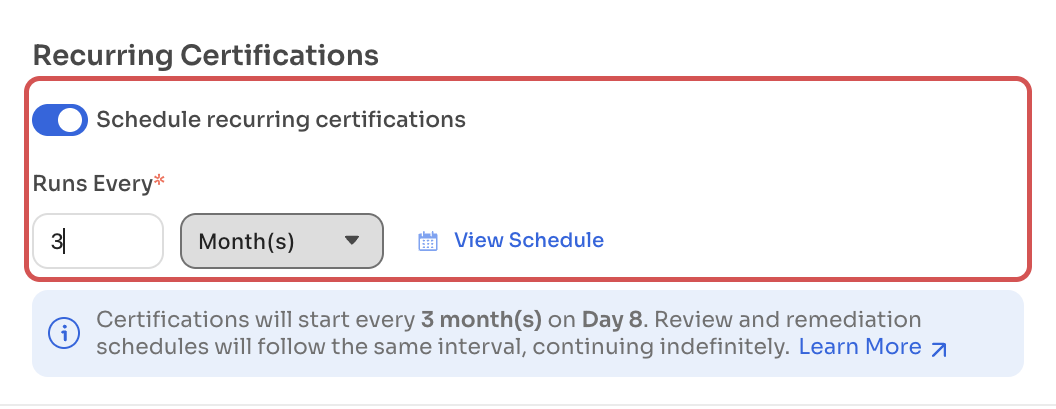
Under Recurring Certifications, turn on Schedule recurring certifications.
-
In Runs Every, enter the interval in months (for example, 3 for a quarterly review). Zluri shows a summary such as Certifications will start every 3 month(s) on Day 8. Review and remediation schedules will follow the same interval, continuing indefinitely.
-
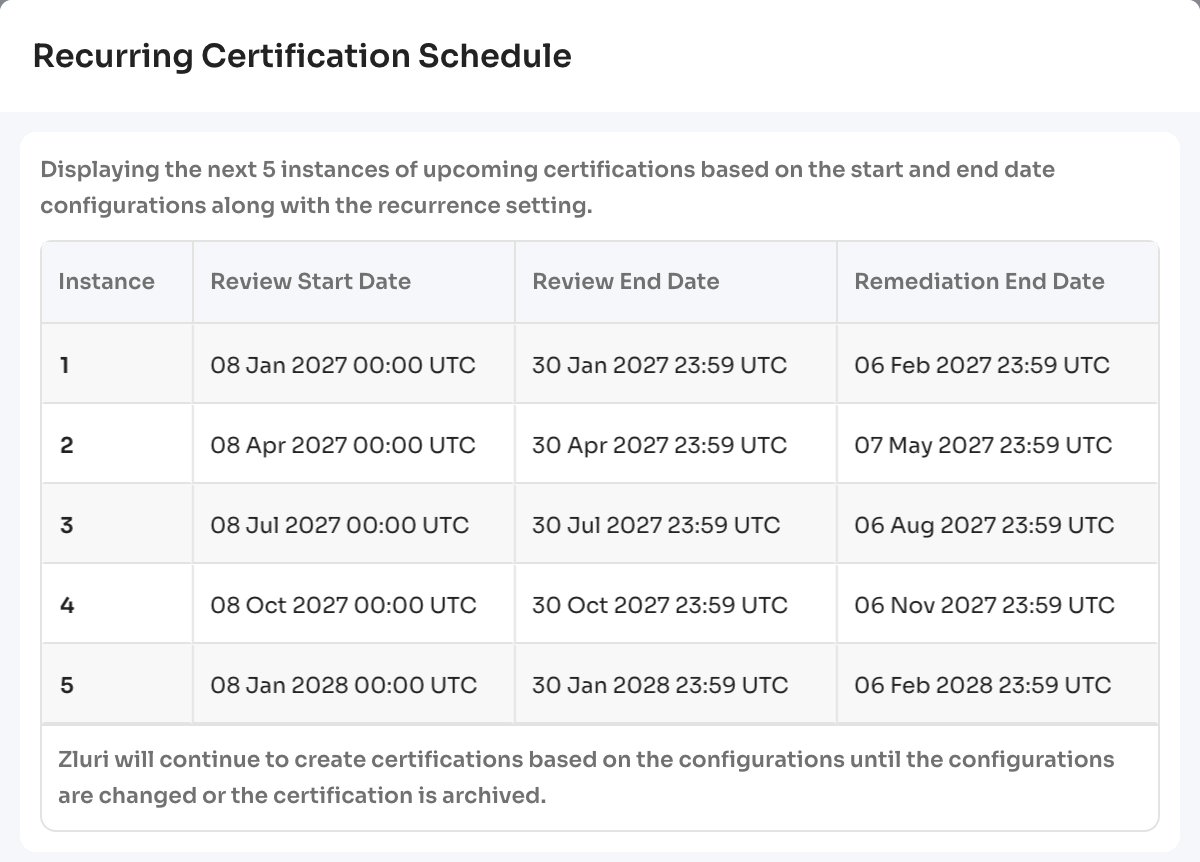
Select View Schedule to check the dates. The Recurring Certification Schedule window lists the next five instances with their Review Start Date, Review End Date, and Remediation End Date in UTC.
-
Select Create to launch the certification.
Future certifications use the same scope and configurations as the first one.
View and stop upcoming instances
Zluri continues to create certifications based on the configuration until the configuration is changed or the certification is archived.
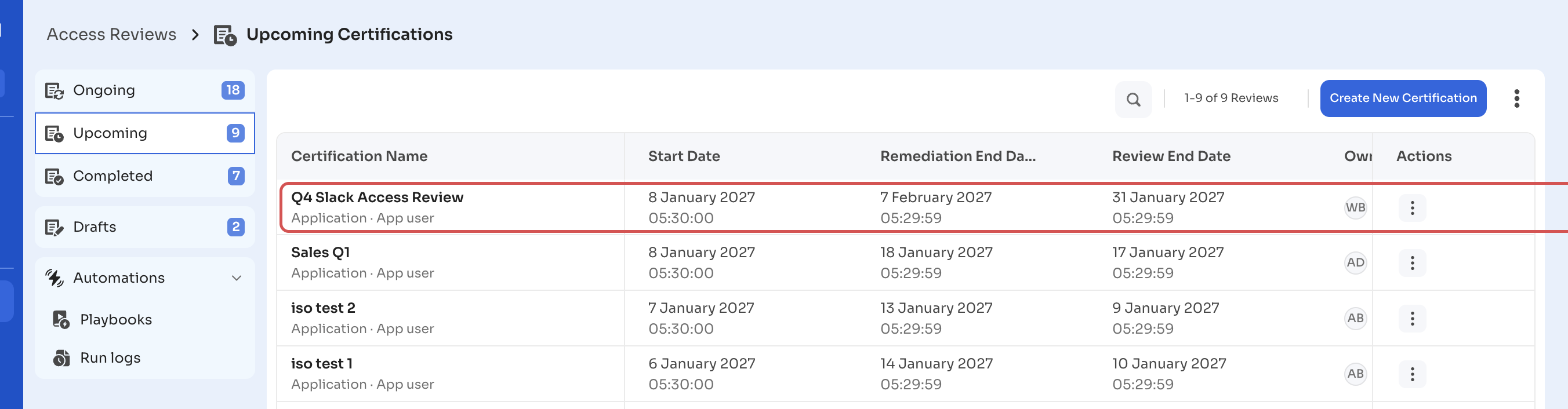
- The next scheduled instance of a recurring certification appears in the Upcoming tab of Governance → Access Reviews → Certifications, with its start date, review end date, and remediation end date.
- To stop future instances, archive the certification from its row menu (⋮ → Archive). For details, see Archiving recurring workflows.
Got questions? Feel free to submit a ticket or contact us directly at [email protected].
Updated 21 days ago