
Connect
This Guide provides the steps to connect Toggl Track account to Zluri
Prerequisites
- Admin or Owner access to the Toggl organization you want to connect
Integration steps :
Generate API token in Toggl Track
-
Log in to your Toggl Track account.
-
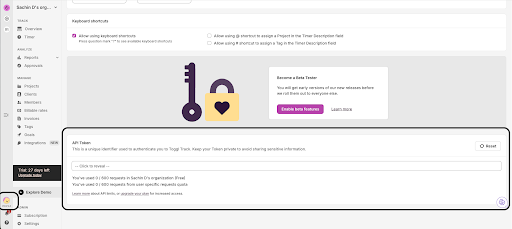
Navigate to Profile > Settings
-
Locate the API Token field.
-
Copy and securely store the API token
Find your Organization ID in Toggl
- Open the organization you want to connect.
- Look at the browser URL. The Organization ID is present in the URL.
Example:https://track.toggl.com/organization/123456/overview
In this example, 123456 is the Organization ID. - Copy and save this Organization ID. You will need it during connection setup.
Begin Integration with Zluri
-
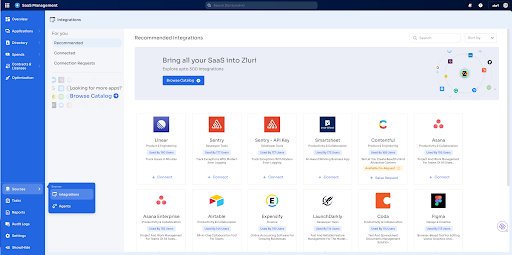
Log in to the Zluri dashboard, visit the Integrations Catalog.
-
Search for Toggl Track and click ➕ Connect.
-
Review the required scopes displayed for the integration.
-
Enter the following details:
- Organization ID — The organization you want to connect on Toggl.
- API Token — The API token copied from Toggl Profile settings
- Password — Enter your password. Default password : “api_token”
-
Click Connect.
-
Provide a connection name and description to help identify this connection.
-
Click Save. Your Toggl account is now connected.
Got questions? Feel free to submit a ticket or contact us directly at [email protected].
Updated 6 months ago
Did this page help you?