
Accounts
Overview
Zluri now discovers and displays individual accounts within your connected applications. An account is the identity a person or system uses to access an app. It may be tied to an email address, identified by a username, or represent a non-human identity such as a service account.
Previously, accounts that were not tied to a standard email address went undiscovered. This included accounts on platforms where users are identified by username (such as GitHub), accounts tied to multiple email addresses, and service accounts. This release surfaces all of these so you have a complete picture of who and what has access within each app.
Zluri discovers accounts through direct integrations and SSOs. Connect your apps through a direct integration or SSO to start seeing account data.
What are accounts?
An account is a distinct identity within an instance. The same person can have multiple accounts in the same app, for example a personal account and a work account, or accounts tied to different email addresses. Accounts also include non-human identities such as service accounts and system identities.
Each account belongs to a specific instance and carries its own status, role, source, and license information. Zluri discovers accounts automatically through your direct integrations and surfaces them in the Accounts tab on the app page.
View accounts for an app
Navigate to the app page and select Accounts from the sidebar to see all discovered accounts across all instances.
The accounts table displays the following columns.
| Column | Description |
|---|---|
| Account Name | The account's display name, including usernames for username-based apps and non-human identity names |
| Account Email | The email address associated with the account |
| Account Role | The role assigned to the account, or + Add Role if none is set |
| Account Licenses | Licenses tied to the account |
| Application Instance | The instance this account belongs to |
| Source Sources | The integration source badge |
| Account Status | Current status: Active, Inactive, or Suspended |
Use the All Instances dropdown at the top left to filter accounts by a specific instance.
View account details
Select an account name from the accounts table to open the account detail side sheet.
The side sheet has three tabs.
| Tab | What it shows |
|---|---|
| Overview | Instance Details section showing Account Identifier, Account Name, Account Login ID with status indicator, Account Type, and Instance |
| Sources | The integration sources that discovered this account |
| Roles | Roles assigned to this account |
The instance badge in the top right corner of the side sheet shows which instance the account belongs to.
Overview tab
The Instance Details section on the Overview tab shows the following fields.
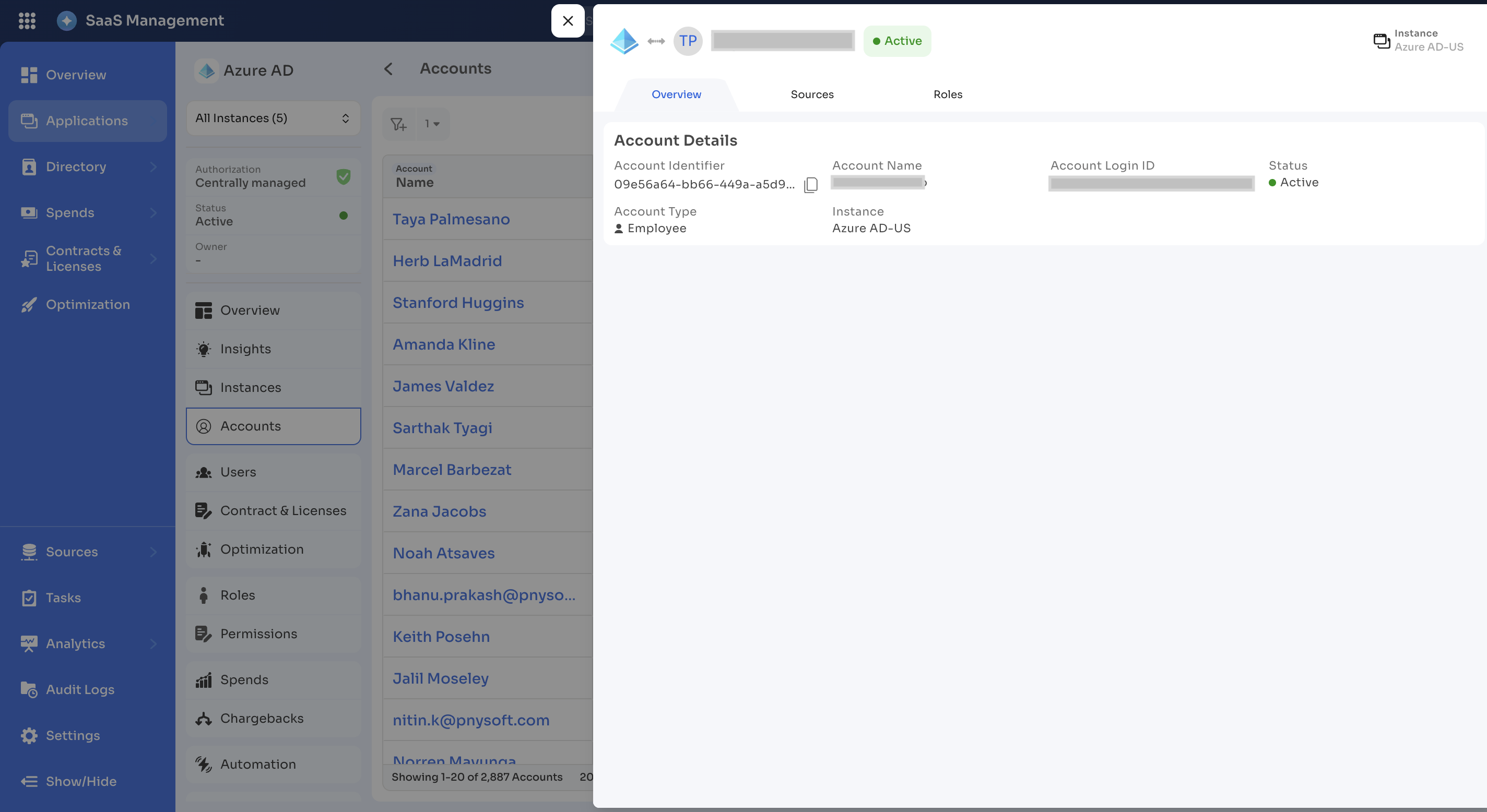
| Field | Description |
|---|---|
| Account Identifier | The unique internal identifier Zluri uses for this account |
| Account Name | The display name of the account |
| Account Login ID | The login identifier (email address or username) with a status indicator |
| Account Type | The type of account: Employee, Service Account, or other non-human identity types |
| Instance | The instance this account belongs to |
Sources tab
The Sources tab lists the integration sources that discovered this account, including the source name, source type, and sync status.
Roles tab
The Roles tab lists roles assigned to this account within its instance.
Account statuses
Each account has one of three possible statuses. Zluri determines the status based on your configured source prioritization settings.
| Status | Meaning |
|---|---|
| Active | The account is in use based on the configured source prioritization |
| Inactive | Zluri did not find the account in any configured source, or all sources report it as inactive |
| Suspended | The account is suspended in the source application |
For more on how Zluri determines active and inactive status, see Source prioritization.
Constraints
The following constraints apply to accounts.
- Zluri discovers accounts through direct integrations and SSOs. Apps connected through agents or other discovery methods do not surface account data.
- Zluri does not support license counting or optimization at the account level. License management continues at the app and user level.
Updated 3 months ago