
Identities Module overview
This is available as an Early Access Module
The Identities module gives you an inventory of every identity in your environment, both the people who work in your organization and the non-human identities that act on their behalf: service accounts, workload identities, application identities, bots, and secrets.
Directory records tell you who your users are, but they stop short of the tokens, keys, service principals, and pipeline identities that hold real access to your applications. The Identities module brings those into the same inventory, links each one to the accounts it uses and the entitlements it holds, and tracks who owns it. Zluri classifies identities from the sources you have already connected, so the module fills itself with just integration setup on your part.
What the Identities module includes
The table below summarizes what each area of the module covers.
| Capability | Description |
|---|---|
| Overview dashboard | Thirteen widgets covering identity counts, the human and non-human split, non-human identities by type bucket, privileged identity counts, orphaned identity counts and their privilege split, secret expiry, the owners holding the most privileged non-human identities, and the applications with the most privileged access |
| Human identities inventory | Every employee and external identity, with directory attributes, application counts, usage, and privilege status |
| Non-human identities inventory | Service accounts, workload identities, application identities, bots, and secrets, grouped into type buckets and all their attributes |
| Unclassified identities | Identities Zluri discovered but could not classify into a defined type |
| Orphaned and privileged filters | One-select filters that isolate identities with no valid owner, or identities holding at least one privileged role or permission |
| Identity detail view | Per-identity overview, accounts, applications, and entitlements |
| Account detail sheet | Per-account overview, per-source status, and the roles, permissions, and groups the account holds |
| Application accounts | Every account discovered in one application, scoped by instance, with inline owner, accessor, and role assignment |
| Ownership management | Assign, add, and remove owners from an identity table, from an identity's detail view, from a single account, or across identities in bulk |
| Accessor tracking | Record which identities access a given account so the relationship appears on the identity |
| Inline editing | Change an identity's name, type, status, description, owners, and archive state |
How Zluri classifies identities
Zluri sorts every discovered identity into one of three inventories. The left navigation lists them under Inventory: Human, Non Human, and Unclassified.
Human identities cover the people in your organization and the people outside it who hold access. Non-human identities cover everything that authenticates and acts without a person driving it. Anything Zluri discovers but cannot map to a defined type lands in Unclassified, ready for you to assign the correct type.
The table below shows which types belong to each inventory.
| Inventory | Types included |
|---|---|
| Human | Employee, External |
| Non Human | Service Account, Shared Account, CI/CD, Managed Identity, IAM Role, Container, Connected App, Service Principal, Webhook, SAML App, OAuth App, Bot, API Token, SSH Key, Certificate, GPG Key, OAuth Token |
| Unclassified | Identities discovered from a source that Zluri could not match to any defined type |
Non-human identities are further grouped into five type buckets, shown as tabs across the top of the Non-Human Identities page. The table below shows which types each bucket holds.
| Bucket | Types in the bucket |
|---|---|
| Service Accounts | Service Account, Shared Account |
| Workload Identity | CI/CD, Managed Identity, IAM Role, Container |
| Application Identity | Connected App, Service Principal, Webhook, SAML App, OAuth App |
| Bots | Bot |
| Secrets | API Token, SSH Key, Certificate, GPG Key, OAuth Token |
The All tab holds every non-human identity across all five buckets.
Review the identity landscape
Navigate to Identities > Overview for a summary of your identity estate. The page holds
thirteen widgets across five rows: counts, then the two landscape charts, then the risk and
expiry counts, then the orphan widgets, then three widgets on privileged access and secret expiry.
Steps
-
Navigate to Identities > Overview.
-
Read the four count widgets in the top row for the size and shape of your estate:
Total Identities, Human Identities, Non Human Identities, and
Total Privileged Identities. -
Read the Identity Landscape chart, which splits every identity into Human, Non-Human,
and Unclassified. -
Read the NHIs by Type Buckets chart, which splits your non-human identities across
service accounts, secrets, application identities, workload identities, and bots, to reveal
which kinds show up the most. -
Read the four count widgets in the third row for the items that most often need action:
Orphaned NHIs, Secrets Without Expiry, Secrets Expiring in Next 30 days, and
Privileged Non Human Identities. -
Read the Orphaned NHIs chart to see how many of those orphans hold privileged access,
and NHIs at Risk of Becoming Orphaned for the ones heading that way. -
Read Owners Holding the Most Privileged NHIs and Top 5 Apps by Privileged Access to
see where privileged access concentrates, and Secrets Expiring in Next 30 days for the
1 day, 7 day, 15-day and 30-day breakdown.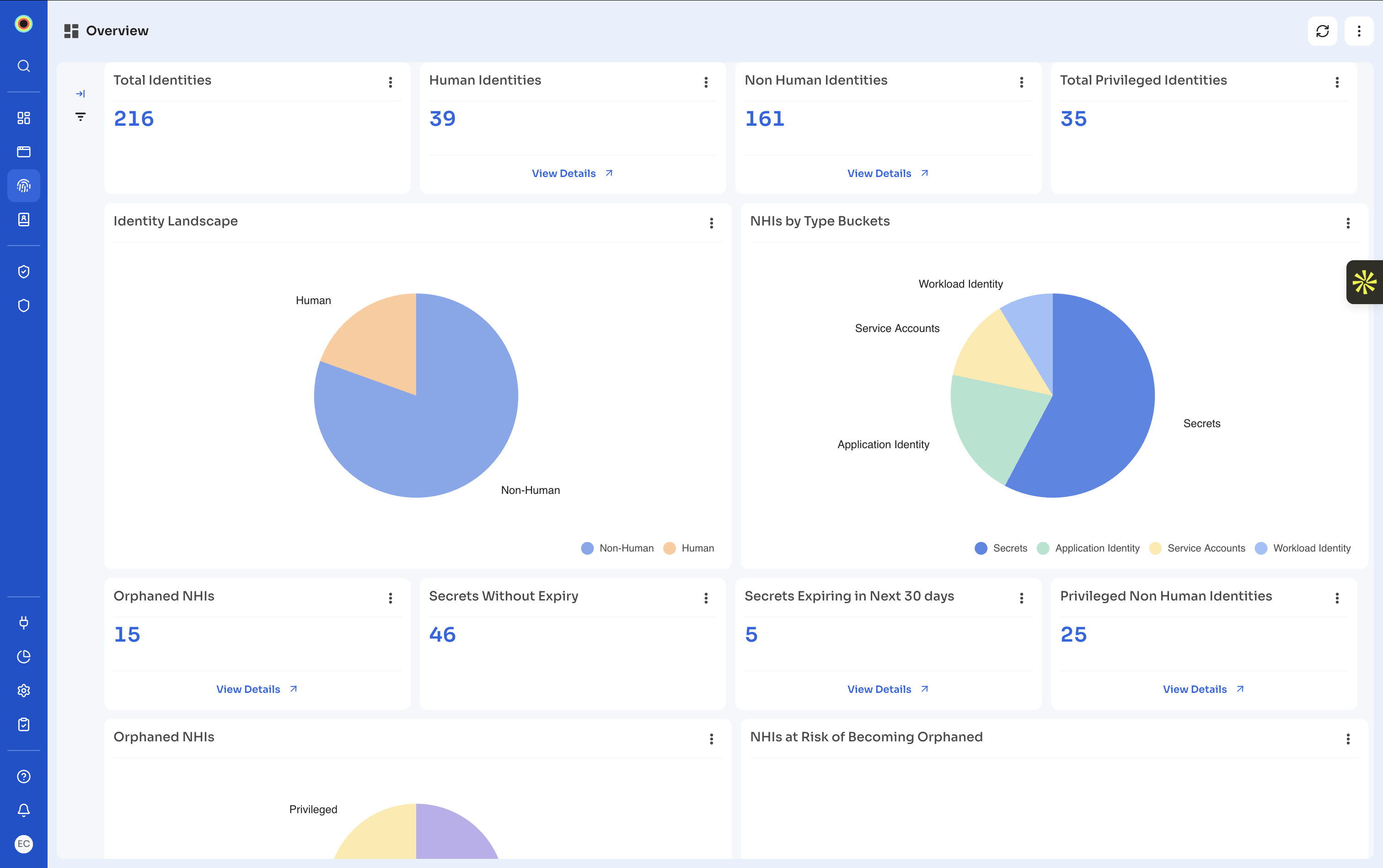
| Widget | What it shows |
|---|---|
| Total Identities | Count of every identity Zluri has discovered, human and non-human |
| Human Identities | Count of employee and external identities |
| Non Human Identities | Count of service accounts, workload identities, application identities, bots, and secrets |
| Total Privileged Identities | Count of identities holding at least one privileged role or permission, across human and non-human |
| Identity Landscape | Pie chart splitting every identity into Human, Non-Human, and Unclassified |
| NHIs by Type Buckets | Pie chart splitting non-human identities across service accounts, secrets, application identity, workload identity, and bots |
| Orphaned NHIs | Count of non-human identities with no owner, or an inactive or archived owner |
| Secrets Without Expiry | Count of secrets that carry no expiry date |
| Secrets Expiring in Next 30 days | Count of secrets due to expire within 30 days |
| Privileged Non Human Identities | Count of non-human identities holding at least one privileged role or permission |
| Orphaned NHIs (chart) | Pie chart splitting the orphaned non-human identities into Unprivileged and Privileged, which shows how much of the orphan backlog carries real risk |
| NHIs at Risk of Becoming Orphaned | Non-human identities whose last standing owner is heading towards inactive status |
| Owners Holding the Most Privileged NHIs | Table of Owner Name against Number of Privileged NHIs, ranked, showing where privileged non-human access concentrates |
| Top 5 Apps by Privileged Access | Table of App Name against Number of Privileged Identities, ranked |
| Secrets Expiring in Next 30 days (chart) | Bar chart of the number of secrets expiring within 1 day, 7 days, 15 days and 30 days |
Filter for orphaned and privileged identities
Two filter chips sit above every identity table and answer the two questions that come up most often.
The table below explains what each filter returns.
| Filter | What it returns |
|---|---|
| Orphaned Identities | Identities that have no owner, or whose owner is inactive, or whose owner is archived. Available on the Non-Human Identities page. |
| Privileged Identities | Identities that hold at least one privileged role or permission. Available on the Human, Non-Human, and Unclassified pages. |
Zluri always resolves ownership to a human or a group, so an orphaned non-human identity is one that no active person is accountable for. See How Zluri determines owners.
Where to go next
The table below points to the rest of the documentation for this module.
| Document | What it covers |
|---|---|
| Working with identities and accounts | Browsing each inventory, reading an identity's accounts, applications and entitlements, assigning owners, acting on accounts, and editing identity details |
Updated 2 months ago