
SoD Violation Insights in Access Requests
Segregation of Duties (SoD) violation insights show approvers the SoD conflicts that approving an access request would create, before they decide.
An access request that suits the requester’s role can still combine with access they already hold to breach an SoD policy. A request for Write access on GitHub looks routine until it lands with someone who already belongs to a group granting production deployment, at which point approving it lets one person author a change and ship it. The approval creates that conflict rather than surfacing an existing one, and without the conflict visible on the request, the approver has no way to weigh it.
Organizations with the Segregation of Duties module get access to this feature. Users with Owner or Admin roles turn it on once for the organization, and it stays off until they do. For how SoD policies work, refer to SoD Overview.
The role field on the access request form must use Zluri data as its source. Where an application’s request form collects roles through a custom field, Zluri has no entitlement to evaluate against the policy, and predicts no violation for that request.
What this feature enables
The capabilities below cover everything SoD violation insights add to an access request.
| Capability | Description |
|---|---|
| Organization-level setting | A single toggle turns policy violation insights on for every approver, independent of the behavioral insights toggle |
| Compliance risk detected signal | A summary signal on the request stating how many violations approving would create |
| SOD violation section | A counted section in the Zluri Insights panel listing every conflict the approval would create |
| Conflict detail | Set A and Set B show the entitlements that would collide, with a counted link to the full set of triggering combinations |
| Severity ratings | Each violation card carries the rating set on the policy |
| Violations in the decision record | Predicted violations appear in the confirmation modal as selectable items, recorded with the outcome and reason |
Turn on policy violation insights
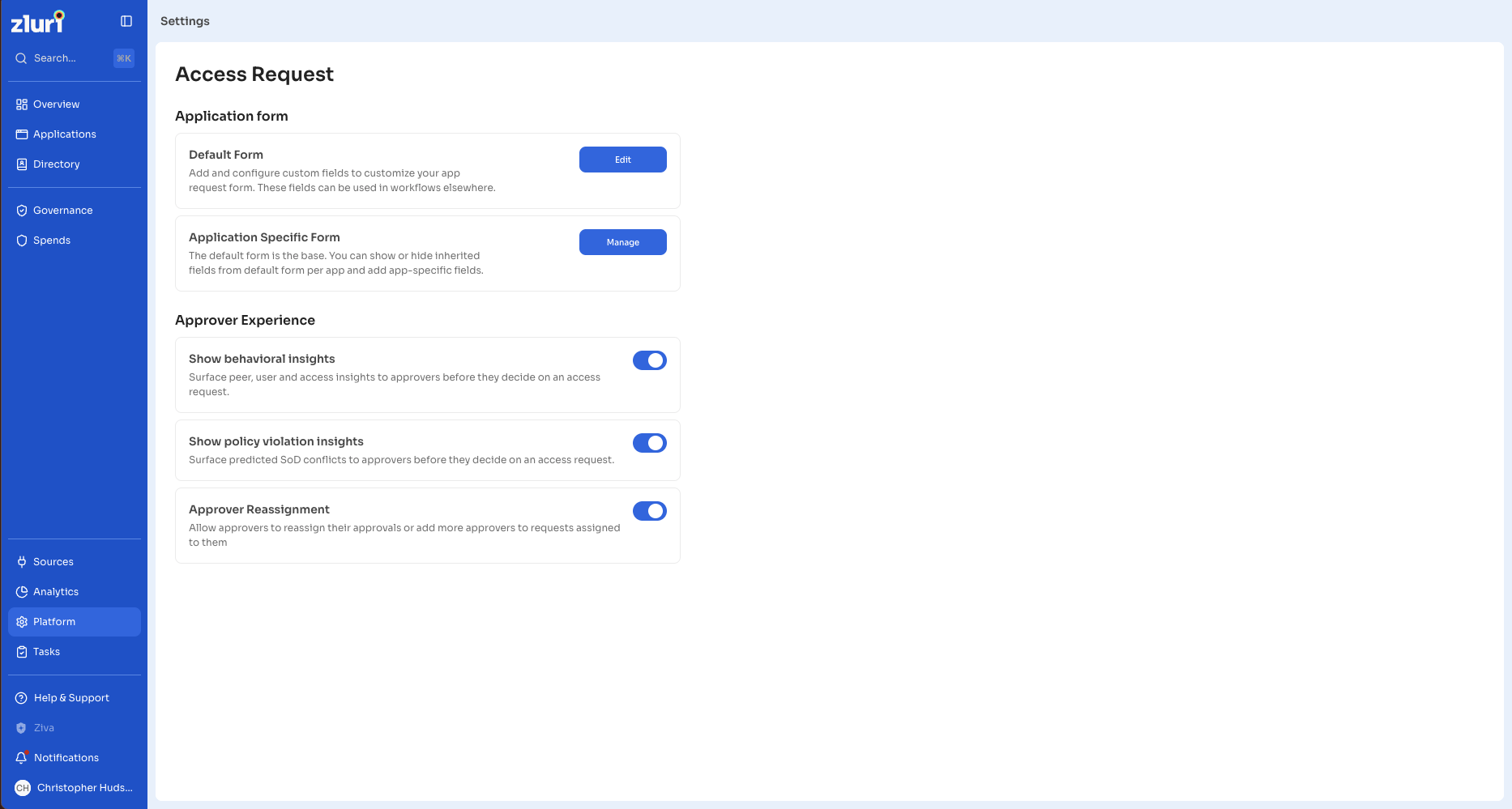
Go to Settings > Access Request > Approver Experience to reach both approver insight settings. Show behavioral insights controls peer, user, and access insights. Show policy violation insights controls SoD violation insights. The two settings operate independently, so an organization turns on either, both, or neither.
Access Request settings page showing the Approver Experience section with both toggles :
Steps
- Go to Settings > Access Request > Approver Experience.
- Turn on Show policy violation insights.
The setting applies to every approver in the organization from that point forward.
Read the compliance risk signal
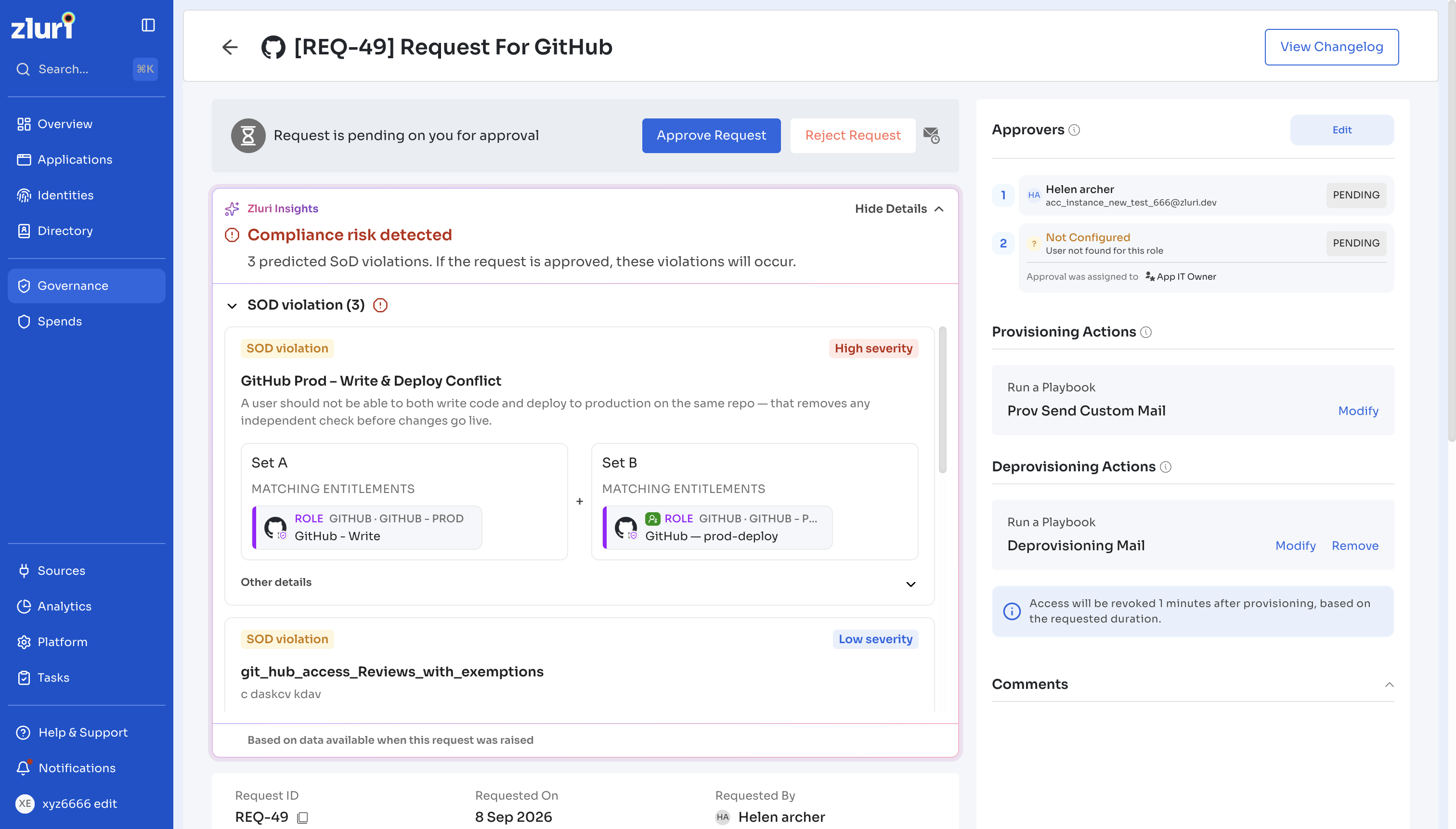
Requests carry a summary signal that consolidates the available context. Compliance risk detected applies when approving the request would create one or more SoD violations, and takes precedence over the other summary signals.
Beneath the signal, Zluri states how many violations the approval would create, in the form “9 predicted SoD violations. If the request is approved, these violations will occur.”
These violations describe what would happen if the approver approves the request. Because the access does not exist yet, the violations carry no exemption status.
Zluri generates the prediction when the requester raises the request, based on the access the requester held at that point. The panel footer states this.
Zluri Insights panel on a request showing the Compliance risk detected signal, the predicted violation count, and the collapsed insight sections beneath it
Review the predicted violations
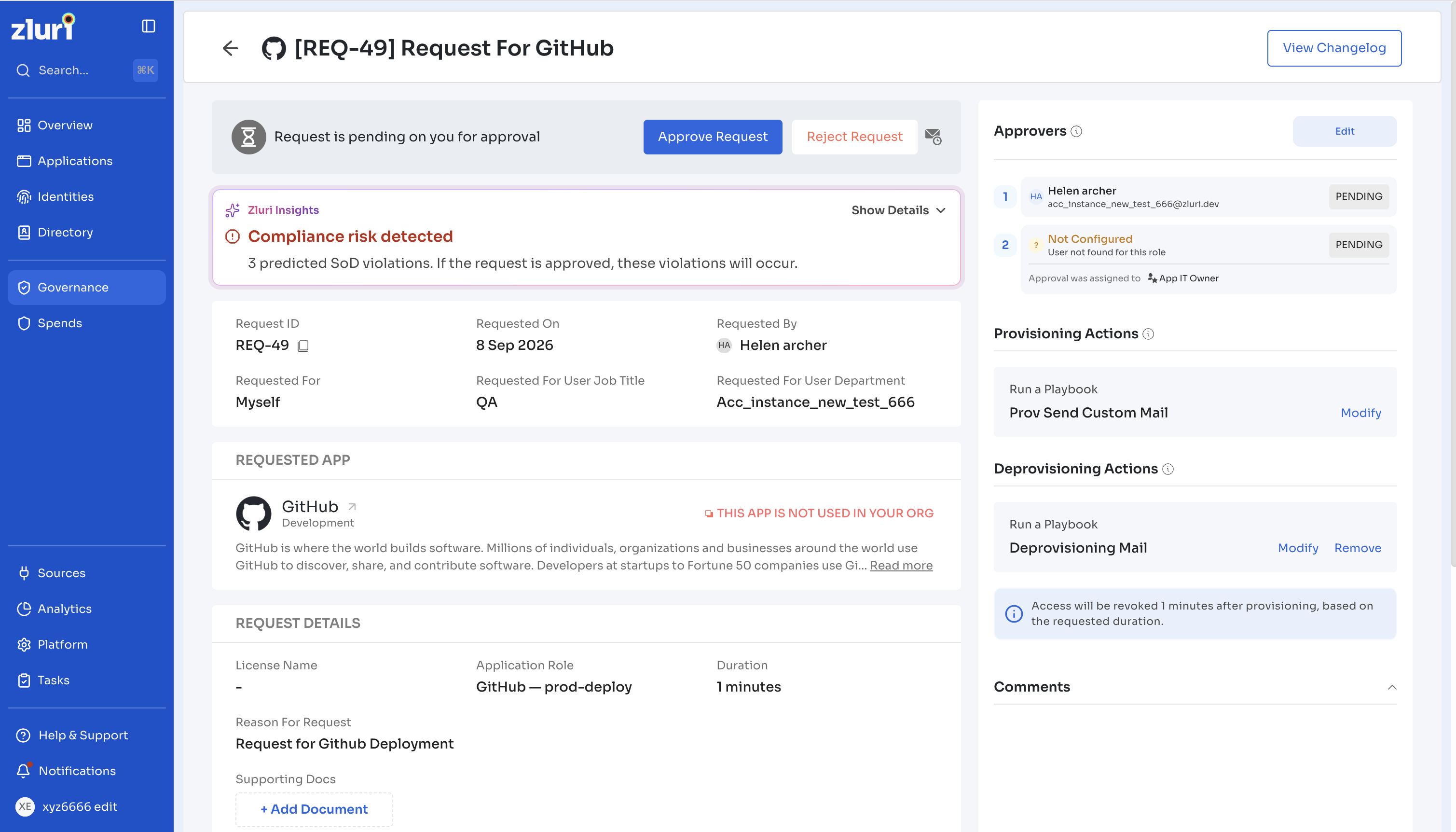
A SOD violation section with a count appears in the Zluri Insights panel, above Peer Insights, User Insights, and Access Insights.
Steps
- Select the SOD violation section to expand it.
- Select Other details on a violation card to see the policy ID, the detection date, and the policy owner.
- Select View all conflicts to see every entitlement combination that triggers the policy.
Each violation card carries the fields below.
| Field | Description |
|---|---|
| Severity | Critical, High, Medium, or Low, at the top right. Severity comes from the policy definition |
| Policy name and description | The policy the access combination would breach |
| Set A and Set B | The two sides of the conflict, each listing its matching entitlements |
| View all conflicts | Shows a count, and opens the complete set of entitlement combinations that trigger this policy - if there are multiple conflicts from the sample policy. |
| Other details | Expands to show the policy ID, the date Zluri detected the violation, and the policy owner |
Set A and Set B hold the entitlements that cannot coexist. A conflict is not always one role against another: the requester can hold multiple combinations of group, role or permission entitlement, and Zluri captures and shows each combination it detects as a conflict.
Approvers who want to question a violation contact the policy owner named under Other details.
Record the violations with a decision
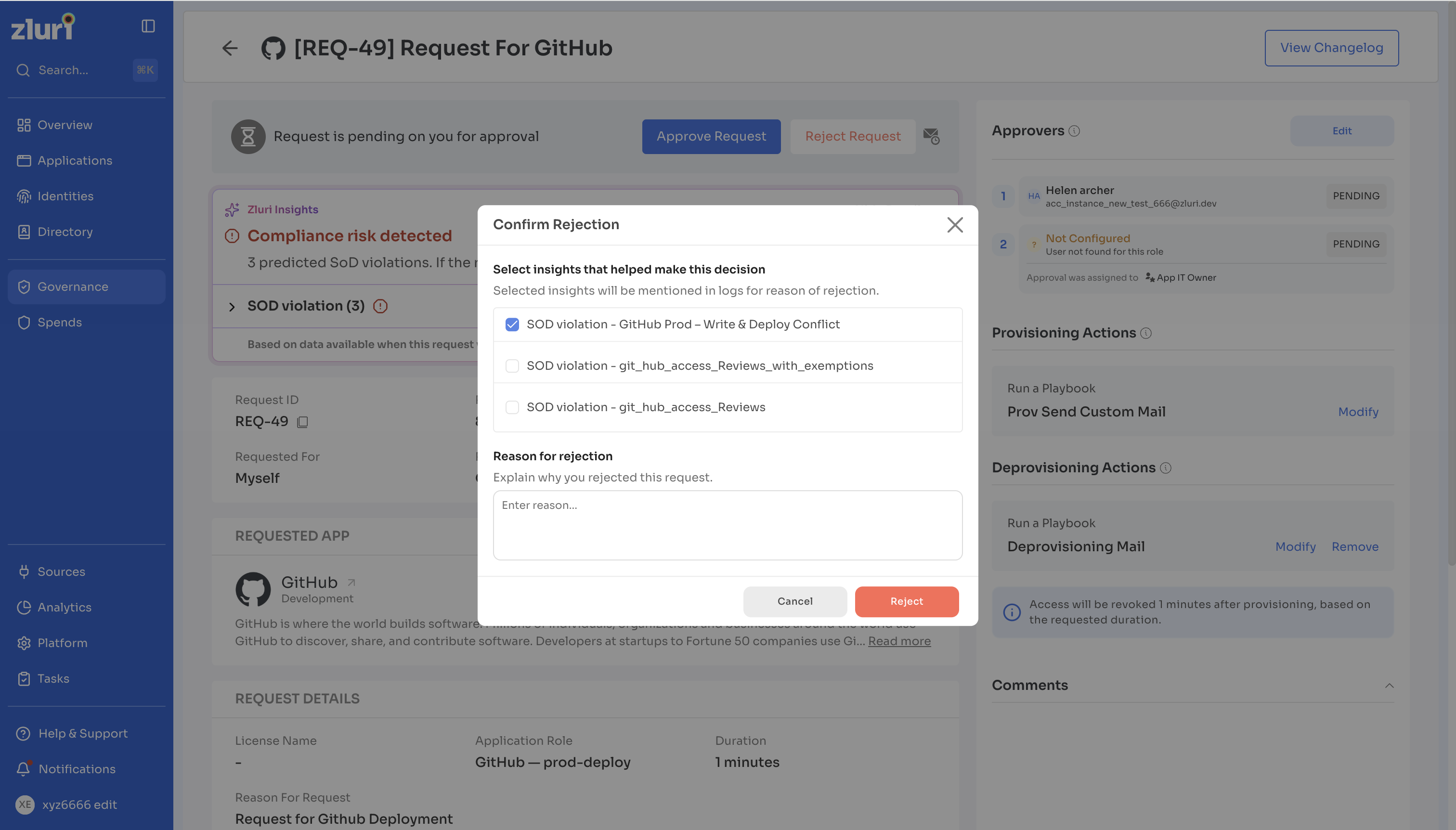
When an approver acts on the request, the confirmation modal lists every predicted violation as a selectable item at the end of the checklist, alongside the peer, user, and access insights. Each entry reads SOD violation - [policy name]. The modal reads “Select insights that helped make this decision” and notes that Zluri mentions the selected insights in logs.
Steps
- Select Approve Request or Reject Request on the request page.
- Select the insights that informed the decision, including any SoD violations the approver knowingly accepts.
- Enter a reason in Reason for approval.
- Select Approve or Reject.
Zluri records the selected violations alongside the outcome and the reason, which shows which conflicts the approver acknowledged and why they proceeded. These insights help approvers use them to fill up the reason for their decision. The approver can either fill the reason manually or select the insights or do both of these as well.
Constraints
The conditions below apply to predicted violations on an access request.
| Constraint | Description |
|---|---|
| Roles must come from Zluri data | The role field on the access request form must use Zluri data as its source. Zluri predicts no violation for a request where the form collects roles through a custom field |
| Violations do not block approval | Zluri shows the conflict as context. Approvers approve or reject as they judge appropriate |
| Selecting violations is optional | Approvers submit a decision without selecting any insight in the confirmation modal |
| Predictions reflect the request date | Zluri generates the prediction from the access the requester held when they raised the request |
| Predicted violations carry no exemption status | The access does not exist yet, so no exemption applies |
| The policy owner appears for reference | The card names the owner of the violated policy |
Permissions and access control
Access to the setting and to the insights differs by role.
| Role | Access | Notes |
|---|---|---|
| Owner | Full access | Turns the setting on or off for the organization, and sees insights when approving |
| Admin | Full access | Turns the setting on or off for the organization, and sees insights when approving |
| All other roles | View only | Approvers see insights on requests assigned to them, and cannot change the setting |
Organizations need the Segregation of Duties module for the setting to appear.
Updated 26 days ago