
Contract Notifications and Reminders
Zluri sends reminders before important contract dates, such as renewals, cancel-by dates, and payments, so the right people can act in time. Zluri also notifies you when a contract PDF draft is ready or when a bulk license mapping finishes.
Reminders go to the owners you assign to the application and the contract. To make sure the right people receive them, add the Primary Owner, Finance Owner, and IT Owner when you create a contract. See Create a Contract.
Contract notifications
| Notification | What it does | Channel |
|---|---|---|
| Contract Management - Contract Renewal Reminder | Reminds contract owners and stakeholders about upcoming contract renewal dates to avoid lapses. | |
| Contract Management - Contract Cancellation Reminder | Reminds contract owners about upcoming cancellation deadlines to ensure timely action is taken. | |
| Contract Management - Payment reminder | Reminds application and contract owners about upcoming payment deadlines to ensure timely action is taken. | |
| Contract Management - True up Reminder | Reminds contract owners and stakeholders about upcoming true up dates. | |
| Contract Management - Contract PDF Draft Generated | Notifies the user when a contract PDF draft has been successfully created and is ready for review. | In-app |
| Contract Management - Bulk License Mapping Completed | Notifies admins when a bulk license mapping operation has been successfully completed. | In-app |
When reminders are sent and who receives them
| Reminder | When it's sent | Sent to |
|---|---|---|
| Contract renewal due in x days | 7, 15, and 30 days before the contract renewal date | Application and contract owners |
| Payment reminder | 7 days and 1 day before the payment due date | Application and contract owners, plus Owner, Admin, IT Admin, Payment Owner, Procurement admin, and Finance Admin |
| Upcoming renewals due next month | The first day of every month at 12:00 AM IST, with a list of contracts up for renewal in the following month | Owner, Admin, IT Admin, and Procurement admin |
| Contract end date reminder | 7 days before the contract end date | Application and contract owners |
| Contract cancel-by date reminder | 60, 30, 15, and 1 days before the cancel-by date. If a contract has no cancel-by date, Zluri calculates these reminders from the contract end date. | Application and contract owners |
Application and contract owners are the App Owner, App IT Owner, App Finance Owner, Contract Owner, Contract IT Owner, and Contract Finance Owner.
Set a one-time reminder on a contract
In addition to the automatic reminders, you can set a one-time reminder for a contract date.
Steps
- Open the contract from the Contracts tab.
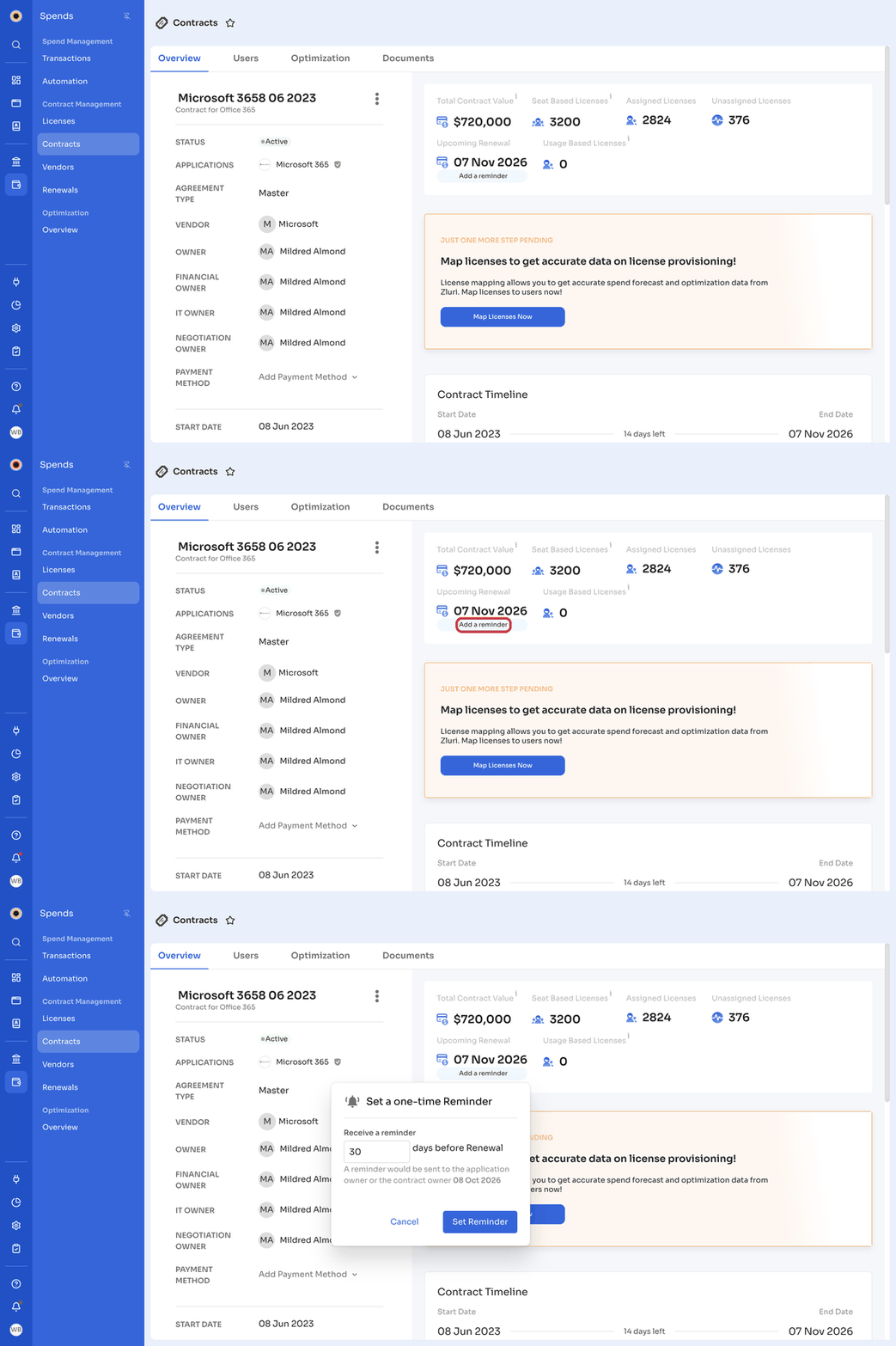
- On the Overview tab, click Add a reminder below the date, for example End Date, Cancel By, or Upcoming Renewal.
- In Set a one-time Reminder, enter the number of days before the date to receive the reminder, for example 30 days before end date.
- Click Set Reminder.
Zluri sends the reminder to you on your registered email and mobile. The Contract Timeline on the Overview tab shows Auto Reminders and your custom reminders.
Manage contract notifications
Steps
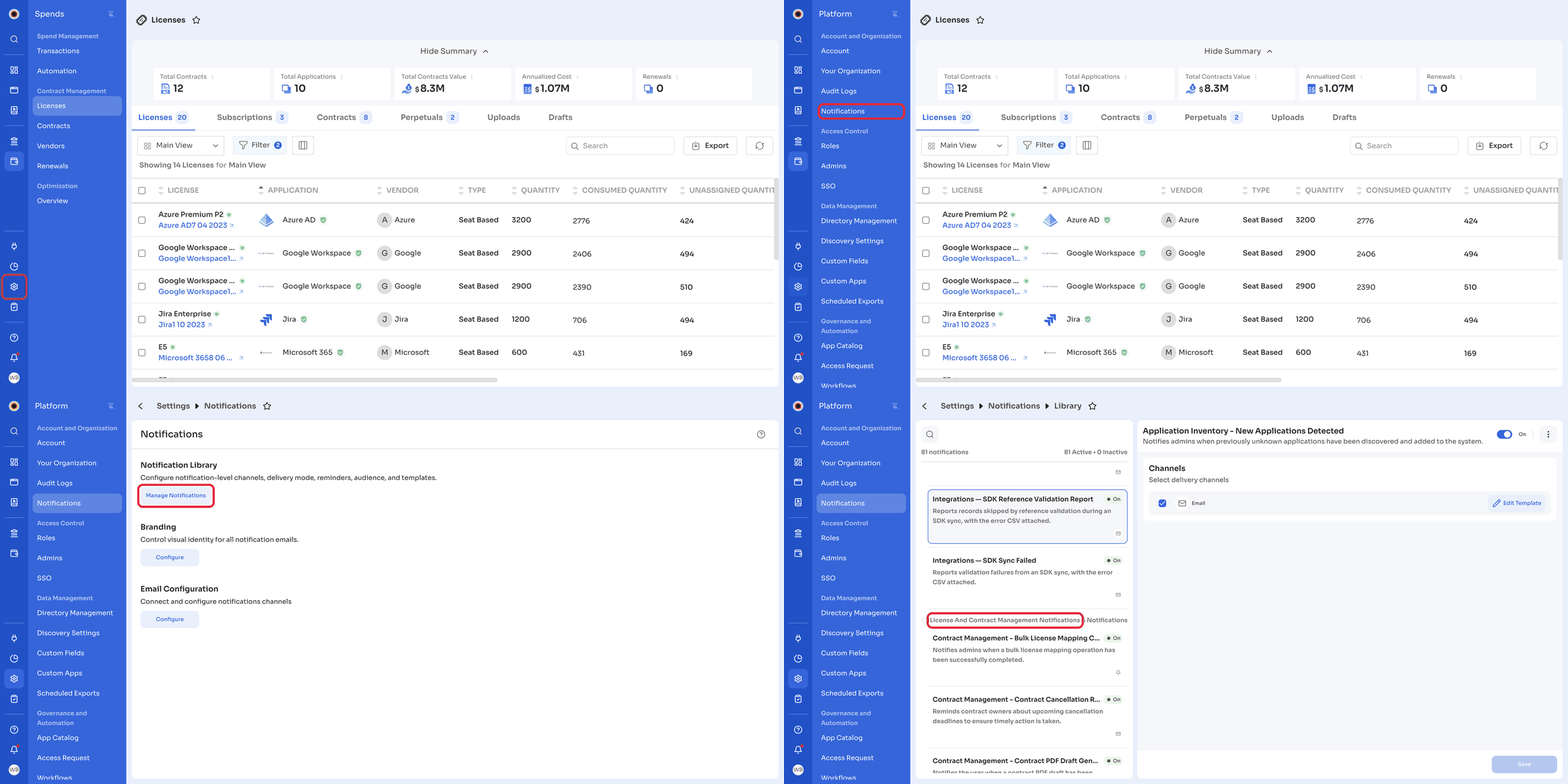
- In the left navigation, click Platform, then click Notifications under Account and Organization.
- Under Notification Library, click Manage Notifications.
- Under License And Contract Management Notifications, click the notification you want to manage.
- Use the toggle to turn the notification On or off.
- To change the email content, click Edit Template. Notifications sent in-app show No template customization.
- Click Save.
To customize the branding of notification emails, see Notification branding.
Related articles
Updated 10 days ago