
Workflows v2 Overview
Beta FeatureThis is currently a beta feature. Please reach out to your account manager to get this feature enabled or to share any feedback.
The new workflow builder lets users compose playbooks on a visual canvas. Each provisioning or deprovisioning step appears as a connected node, and conditional paths appear as named branches.
The earlier builder grouped every step inside an application container and ran them in a single linear sequence. Conditions sat inside those containers at the application level and the action level, which made longer playbooks hard to read and maintain. The new workflow builder replaces that model. Every step becomes an individual node, conditional logic becomes a branch that shows exactly which steps run in which situation, and Zluri saves changes automatically as users work.
Every playbook on the Zluri platform uses this builder, including onboarding and offboarding playbooks, application playbooks, access request playbooks, and access review playbooks. The builder works the same way regardless of which navigation the organization uses. Owners and Admins configure and publish playbooks.
Zluri migrates existing playbooks to the new builder automatically. Every playbook keeps working exactly as before, with no manual rework. See Migration to the workflow builder.
What the workflow builder enables
The table below summarizes the main capabilities across the canvas, action configuration, and run review.
| Capability | Description |
|---|---|
| Visual node canvas | Each step appears as a node on a top-to-bottom canvas with pan, zoom, and single-click selection. |
| Branching | A branch node splits the playbook into as many named branches as a playbook needs, with optional nested branches, an optional else branch, and an option to merge branches back into one sequence. |
| Drag-and-drop rearranging | Move any node to a new position, including into and out of branches. |
| Action renaming and descriptions | Replace the default action name with a custom label and add a description that appears on the node. |
| Variables in every input | Pass dynamic values into any input field of any action, including built-in integration actions. |
| Action testing | Test any action before publishing, then reuse the tested action’s response as a variable in later actions. |
| Granular action variants | Choose broken-down versions of composite actions when a playbook needs step-by-step control. |
| Search across apps and actions | Find an action by typing either the application name or the action name in a single search. |
| Setup checklist | See every incomplete or misconfigured action in one list and jump straight to the step that needs attention. |
| Automatic saving | Zluri saves each change as it’s made, with no manual save step. |
| Playbook viewer | Review a playbook’s full configuration on the canvas without entering edit mode. |
| Graph-based run review | Review a completed or in-progress run on the same canvas, with per-node status and per-node execution details. |
Node types
Nodes are the individual steps on the canvas. The table below lists every node type and what it does.
| Node type | Description |
|---|---|
| App action | An action that runs against a connected application, such as creating a user in Okta or adding a user to a group in Azure AD. |
| Branch | A split point that routes the playbook down one of several named paths based on conditions. |
| Manual task | A task assigned to a user, a Zluri role, or a group for someone to complete by hand. |
| Custom action | A reusable API-based action configured for an integrated or non-integrated application. |
| HTTP request | A one-time API call, with or without callback support. |
| Zluri action | A platform operation such as updating a user in Zluri or triggering another playbook. |
Approvals, delays, and conditions stay attached to individual actions rather than becoming separate nodes. Configure them in the right panel of the action they apply to. See Build a playbook in the workflow builder.
How branching works
A branch node holds two or more branches. Each branch carries its own conditions and its own sequence of actions. When a playbook runs, Zluri evaluates each branch’s conditions and runs only the branches whose conditions match the user the playbook runs on.
The table below describes what each part of a branch node controls.
| Part | What it controls |
|---|---|
| Branch | A named path with its own conditions and its own sequence of actions. |
| Branch conditions | The attribute rules that decide whether that branch runs, composed with AND/OR logic and able to reference variables as well as static values. |
| Else branch | An optional path that runs only when no other branch’s conditions match. Leave it empty to run nothing in that situation. |
| Merge toggle | Brings every branch back together into one shared sequence after the branches finish, so steps common to all paths appear once. |
Branches nest. A branch inside a branch splits a path further, for example splitting a marketing path into a manager path and an associate path. Branches also reorder freely, and renaming a branch changes the label shown on the canvas, which makes a long playbook easier to read at a glance.
Actions inside a branch that does not run appear as skipped. Skipped actions do not fail a run. A run in which six actions succeed and four are skipped finishes as Completed.
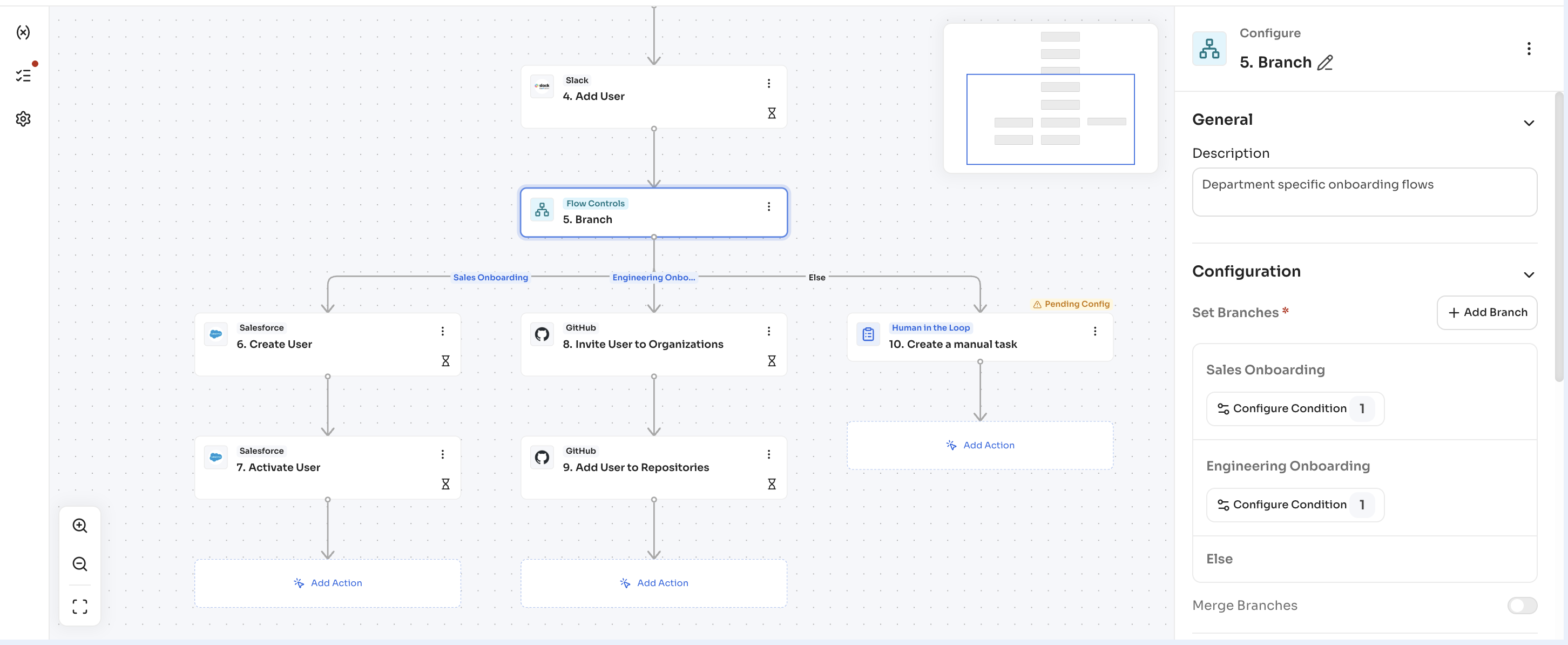
See Add and configure branches for the full procedure.
Availability across playbook types
Every playbook type uses the workflow builder with the same capabilities. What differs is which actions each type offers.
| Playbook type | Actions available |
|---|---|
| Onboarding and offboarding | Actions across every connected application, plus Zluri actions. |
| App playbooks | Actions for that application only, plus Zluri actions such as triggering another playbook and making an HTTP request. |
| Access request, access review, SOD, and application management playbooks | Internal actions and Zluri actions such as making an HTTP request and creating a manual task. |
Interactions with other features
The table below covers the features that connect to playbooks built in the workflow builder.
| Feature | How it interacts |
|---|---|
| Automation rules | Automation rules keep their existing interface and keep triggering playbooks the same way. Rules need no changes after migration. |
| Access requests and access reviews | Playbooks stay usable across modules, so a playbook built here serves access requests and access reviews as before. |
| Triggering another playbook | A Zluri action triggers another playbook from inside a playbook, which keeps a shared sequence in one place instead of repeating it. |
| Task Dashboard | Manual task nodes create tasks in the existing Task Dashboard. (Open question: confirm Task Dashboard article title/URL.) |
Build a playbook in the workflow builder
Updated 20 days ago