
Connect
Prerequisites
Before you begin the integration at Zluri, ensure the following:
- You have a valid Freshdesk Administrator account.
- You have access to your Freshdesk API Key.
- You know your Freshdesk Sub-domain (e.g.,
yourcompany.freshdesk.com).
Setup Steps
Step 1: Get API Credentials from Freshdesk
1.1 Get the Freshdesk API Key
- Log in to https://freshdesk.com/ using your admin credentials.
- Click your Profile icon in the top-right corner.
- Select View API Key.
- Copy the API Key and store it securely.
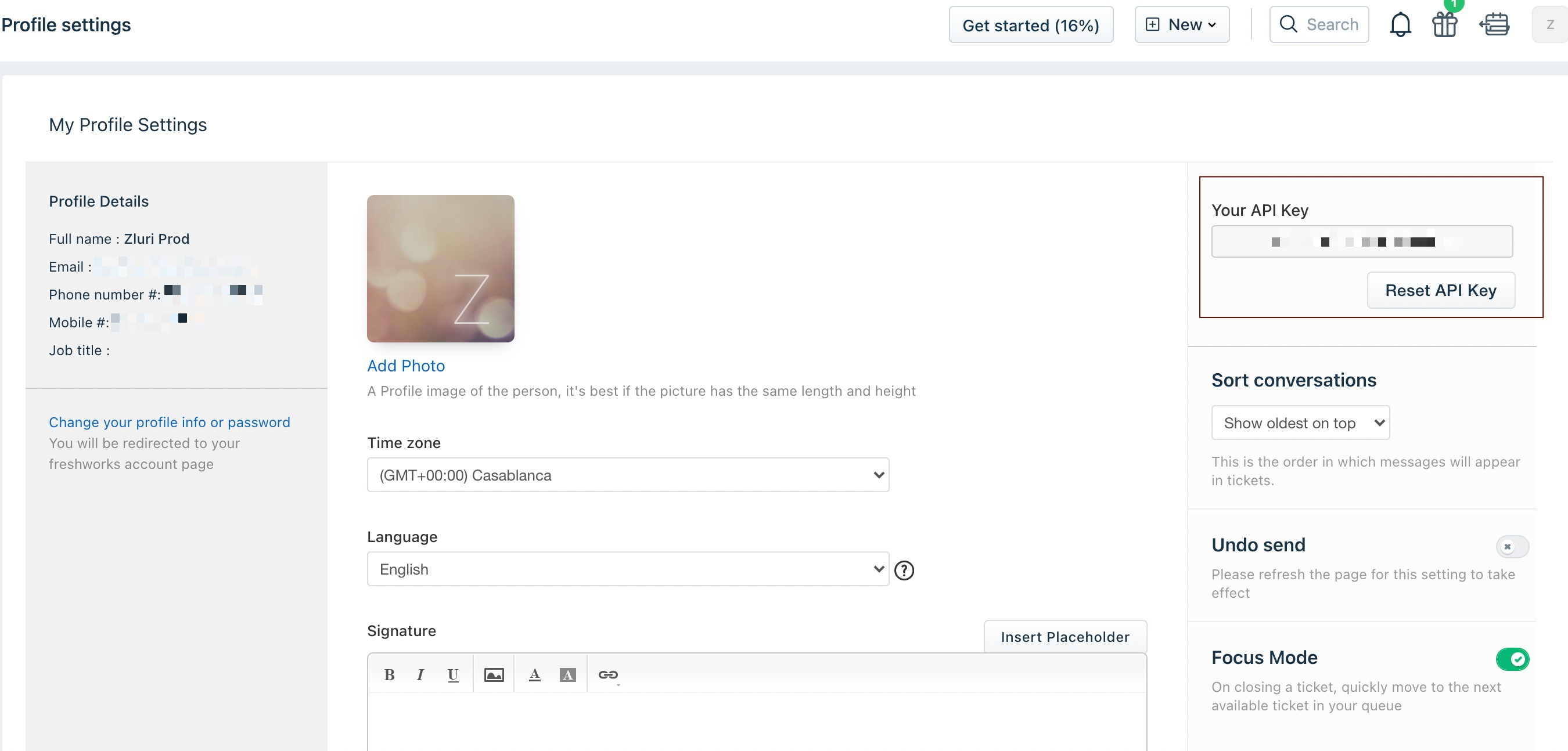
1.2 Get the Freshdesk Sub-domain
- From the same Freshdesk admin account, navigate to Admin Center.
- Go to Helpdesk Settings.
- Your Freshdesk URL will be in the format:
xyz.freshdesk.com. - Copy the
xyzportion — this is your Sub-domain. - Paste it into the Sub-domain field during Zluri integration.
Step 2: Begin Integration at Zluri
- Go to the Zluri Dashboard.
- Navigate to Integrations.
- Search for and select Freshdesk.
- Click Connect or Connect Another Instance.
Step 3: Review and Add Scopes
- Review the pre-selected Required Scopes.
- Optionally, add Other Scopes based on your needs.
- Proceed to select the authorization method.
Authorization Options
Self-Authorization
- You can continue to Step 4 and authorize using your own credentials.
Co-worker Authorization
- Choose "Send to a Co-worker".
- Enter the co-worker's Name and Email ID.
- A unique Connect Code or Authorization Link will be sent to them.
- The co-worker (must be a Freshdesk Admin) will use that to complete authorization in Step 4.
Step 4: Authorize Connection Request
Based on your chosen method in Step 3, either you or your co-worker can now authorize the connection.
Form-based API Authorization
- Enter the required credentials in Zluri:
- Freshdesk API Key
- Freshdesk Sub-domain
- Click Connect to authorize and complete the setup.
✅ Once authorized, the Freshdesk integration will be successfully connected to your Zluri account.
Updated 1 day ago
Did this page help you?